
What is an RCP system?
Time & Attendance (RCP) system is a set of tools and devices that enable the monitoring and documentation of employees' working hours. Instead of manually filling in attendance lists, data is collected automatically: entries, exits, breaks, lateness, overtime. Electronic time recording facilitates time accounting, increases transparency and eliminates errors.
Types of T&A systems
The implementation of an RCP system is not just a formal issue, but a real support in the daily time management i recording of employee attendance. Every company operates differently - different processes, different work dynamics, different needs. That is why time and attendance systems come in different forms.
Card schemes - simple and effective
It is one of the most classic forms of time registration. Employees identify themselves by means of proximity cards (RFID) or magnetic - one touch of the card to the RCP reader, to register entry or exit. These systems are cheap to implement and simple to use, and are therefore often chosen by manufacturing and logistics companies.
But beware - the cards can be handed over to another person. Therefore, in companies where we are particularly concerned about the authenticity of registrations, more advanced solutions are increasingly being relied upon.
Check also: Electronic time recording and PIP - rules and regulations
Biometric systems - security without compromise
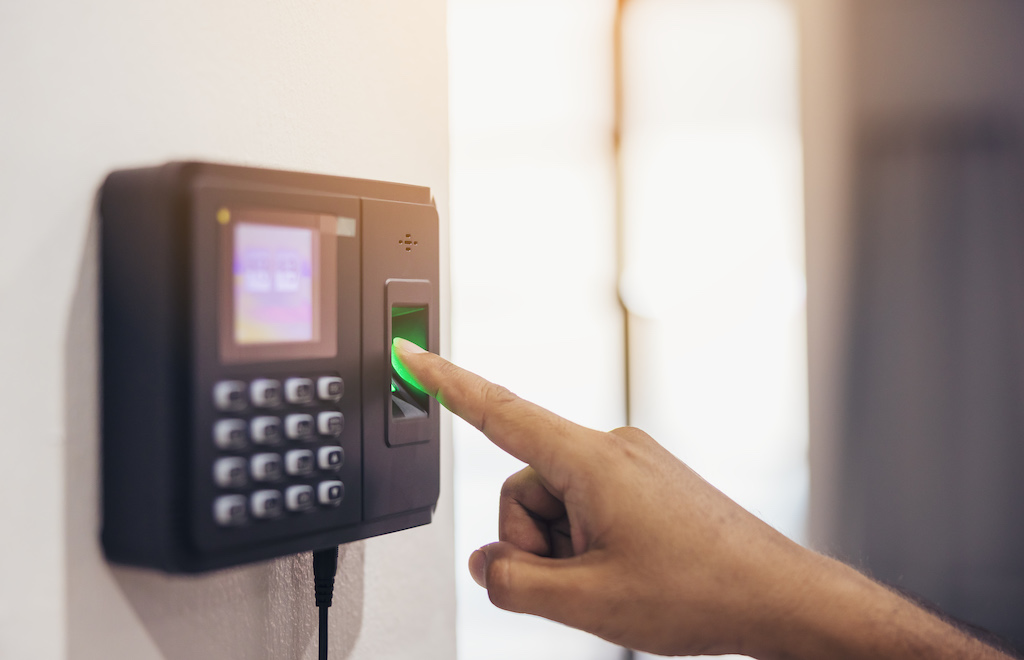
In large establishments, public institutions or companies where the working time of employees is crucial for billing and compliance, biometrics is becoming the standard. Modern RCP systems also allow integration with access control systems, creating a single, consistent employee management environment.
Mobile systems and applications - ideal for remote and field work
Imagine a service brigade heading out into the field every day - different locations, different start and finish times. A traditional reader? Impractical. It is for such scenarios that mobile time recorders - applications that allow record working time from any location, using a smartphone or tablet.
They often use GPS location, scanning QR codes, and some even offer the function of taking a photo as proof of attendance. Such a system is extremely flexible - an employee can start and stop working in the app, and the data immediately goes to the online time registration system.
Online systems in the cloud - access to data anytime, anywhere
When a company grows and the number of employees exceeds dozens or hundreds, running a working time records in Excel is no longer sufficient. What is needed is automation and full availability of data in real time - from anywhere in the world.
Online working time monitoring system, running in the cloud is a solution that meets these needs. There is no need to install any software locally - everything runs in the browser. Data is securely stored, regularly backed up and can be accessed by staff and managers alike - no matter where they are.
The system automatically generates working time reports, takes into account holidays, days off and overtime, and can even help with accounting for business trips. Ideal for both office-based companies and those with a dispersed structure - such as retail chains or transport companies.
You may be interested in: Working in CRM - how do I get started?
Is such a system needed in every company?

Time registration system is indispensable wherever labour law requires record-keeping - i.e. in the vast majority of companies. The greatest benefits will be felt by:
- manufacturing and industrial companies - where it is important to control inputs and outputs and plan for changes,
- offices - where flexibility and the ability to report on remote working time are important,
- service companies and mobile teams - where employees operate from different locations.
The system can be adapted to any working model - stationary, hybrid or remote.
Online RCP system - how does it work?

Modern online working time monitoring system runs in the cloud and is accessible from a web browser. Employees can record working time from a phone, computer or reader, and the data is automatically fed into the system. This enables ongoing tracking of activity, generation of reports, leave management and scheduling.
Card readers for employees
The most popular solutions are T&A card readers - The employee applies the card or key fob to the device when entering and leaving work. This is a quick and intuitive way to recording of working time, It minimises the risk of errors and fraud. It is particularly suitable for companies where simplicity and speed of operation are important.
Biometric readers
Where we care about full access control and the elimination of attempts to „bounce back” for a colleague, it is worth betting on the biometric readers - fingerprint, face or retina recognition. This is the highest level of data security and non-repudiation.
Mobile applications
Mobile time recorder is the ideal solution for remote workers, field workers or distributed teams. Thanks to the applications, you can record working time from any location, using GPS locations, QR codes or photos as proof of presence.
Online RCP ideal for manufacturing companies
Manufacturing companies need a precision control tool working hours of employees, shifts, breaks and overtime. Online RCP allows them to monitor working time with readers and analyse data in real time. It is also a way to increase work efficiency and reduce costs.
Advanced online RCP systems offer operational efficiency monitoring (OEE) functions, allowing you to see how long machines have been active, downtime, breakdowns or changeovers. This data is collected and analysed in real time, giving production managers full control of the workflow, enabling them to react quickly and reduce waste in real terms.
This integrated approach to people and equipment time allows companies not only to have better hourly billing, but more importantly to increase production efficiency, better shift planning and reduce operational costs.
Working time monitoring system for offices
In offices online working time monitoring system is not only an attendance list, but also a tool for time management i accounting for remote working. Employees can log in from anywhere and managers can view reports, attendance and leave requests in one panel.
What does an online RCP need to have? Key features and benefits
Good online RCP programme should offer:
- intuitive interface for employees and staff,
- automatic reports working hours and overtime,
- handling holidays and days off,
- integration with HR and payroll systems,
- possibility to register from different devices (computer, phone, reader),
- compliance with Labour Code i RODO,
- real-time data availability.
Online time recording - which system to choose?
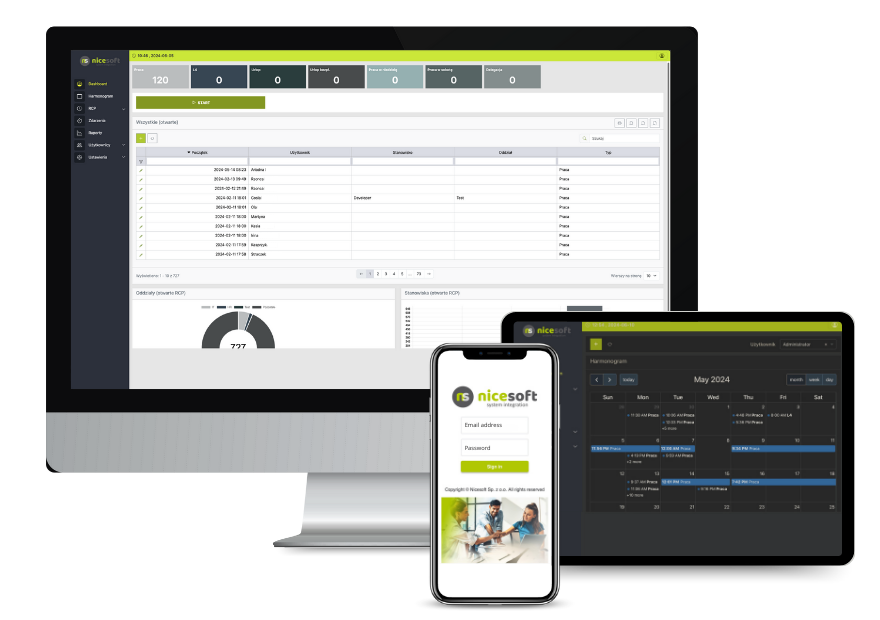
- NiceWorkTime (Nicesoft) - A modern, comprehensive RCP system (online) with a roster planning module, remote recording and reporting. Nicesoft offers systems for monitoring employee working time as for monitoring machine uptime.
- Calamari - ideal for remote working, with integration with Slack and Google Workspace.
- Schedule.co.uk - simple to use, good for small businesses.
- TiqTime - user-friendly interface and geolocalisation option.
Integration with other systems
Modern time registration systems should integrate with:
- HR and payroll programmes (e.g. Optima, Enova, Symfonia),
- ERP and HRM systems,
- calendars (Outlook, Google),
- tools for remote working and project management.
NiceWorkTime offers a wide range of integrations and its API allows processes to be easily automated.
Online time sheets for free
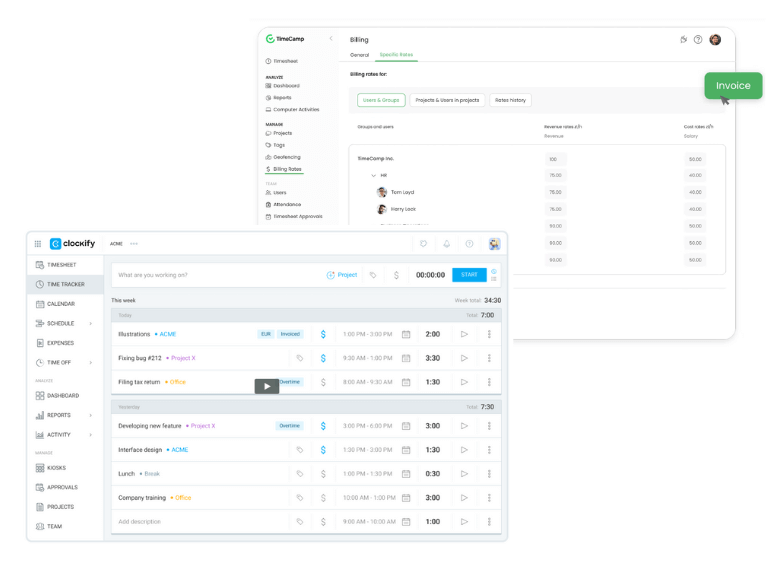
- Clockify - free time recording with simple reports,
- TimeCamp Free - good for recording tasks and remote working.
Free or paid version? Differences
The decision whether to choose free time registration system, whether to invest in paid software, depends primarily on the needs of the company and its expectations of functionality and support.
Free versions will work well for small companies that are just starting to implement a basic working time records and want to test how such a system affects the organisation. However, the limitations of these solutions quickly become apparent - lack of reports, the ability to support only a few users, or the lack of integration with other HR systems are just the beginning of the list.
In turn paid versions provide much more than just comfort. They are, above all compliance with the Labour Code, full automation, ability to generate advanced reports, access to archive data, integration with payroll and HR systems, as well as technical support in case of problems. For medium and large companies - this is often the only viable option.
Comparison of free and paid RCP systems:
| Function / Feature | Free version | Paid version |
|---|---|---|
| Number of users | Limited (e.g. up to 5-10 people) | Free - scalable for large teams |
| Reports and statements | None or very limited | Automatic, customisable reports |
| Technical support | Usually no | Full support, helpdesk, updates |
| Compliance with labour legislation | Not always provided | Guaranteed compliance with the Labour Code |
| Browser access (online) | Sometimes no or limited | Permanent access from anywhere |
| Additional functions (e.g. holidays, work schedule) | Rarely available | Fully accessible and automated |
| Security and data backup | Low control | Encryption, backups, archiving |
| Integration with other systems (HR, ERP) | No | Possibility of integration with company systems |
Conclusion? If you run a small service business with a few employees, a simple free RCP system may be enough to get you started. But if you want a professional approach to time recording and time-keeping, increased work efficiency, compliance with regulations and consistent time management via the internet – paid version of the T&A system will be a sensible and future-proof investment. It will not only provide full automation of working time recording and access to advanced reports, but also integration with other systems in the company - HR and payroll, ERP or access control systems. This will give you more control, fewer mistakes, save you time and ensure that your company is operating in compliance with employment legislation.
In the long term, it is a solution that realistically translates into better staffing decisions, higher team productivity and lower operating costs.
How much does the RCP cost?
The cost of the system depends on the number of employees, functionality and form of licensing. For example:
- small companies - between £20 and £100 per month,
- medium-sized and large organisations - from £200 upwards,
- dedicated systems or systems with extended functions - even several thousand PLN per month.
See also: Time and attendance recording for public institutions
Summary
Implementing an online timekeeping system today is an investment with real benefits: time savings, legal compliance, full control and increased productivity. Whether you run a production company, an office or a team working remotely, a well-chosen online RCP system will help you manage your time, budget and team with greater precision. When choosing a system, pay attention to functionality, intuitiveness, integration capabilities and level of technical support. And if you are looking for something comprehensive, flexible and future-ready - NiceWorkTime will be one of your best choices.
 Polish
  English