What is data backup in a company and how is a data backup created?

Backup tools are easy to use, and the backup process is intuitive, meaning that even companies with fewer resources can benefit from this convenience. A backup's purpose is to quickly restore data in the event of corruption or loss due to system failure, a cyber-attack, or human error. You can then use a backup and continue your operations without incurring any losses.
Read also: Electronic time recording - what is the best programme?
What is the difference between a backup and an archive?

The backup is saved on easily accessible media – these can be external drives, NAS servers or cloud solutions. The main point is to be able to recover data quickly if necessary, which is why, although backups are available in a short time, they do not necessarily have to be stored for years. Archiving serves to secure information that is no longer actively used., but they may prove necessary in the future. Old projects, technical documentation, historical data and other collections must be stored for legal or organisational reasons. Archived files remain unchanged for a long time and are not updated as often as backups.
Do you need a good data archiving program for your company? Check out our offer >> NiceDMS or Contact us!
Types of backups - which data backup to choose for businesses?
There are several different methods for regular backups. The first step should be to select the data to be backed up, as this will differ for every company. Full backups typically include documents, databases, emails, software, and resources necessary for ongoing business operations. Here are three basic types of backup worth considering:
- Full Backup This is a basic type of backup that involves a full save of all data stored by the company. On the one hand, this is a big advantage, but it also takes up a lot of space and consumes more time to perform the backup and when data needs to be restored.
- Incremental Backup it only records information that has been changed since the previous backup was created. As a result, each incremental copy is smaller, as it only covers the latest changes, but data recovery is more time-consuming, as it requires reconstructing all changes since the last full backup.
- Differential or incremental backup It involves creating copies of all changes that have occurred since the last full backup was performed. This means that with each subsequent differential copy, all files added or changed since the full backup are saved. It is less complicated to restore than an incremental backup, as it only requires reading two copies. To restore data, only the last full copy and the last differential backup are needed.
Acronis Cyber Protect – meeting your needs
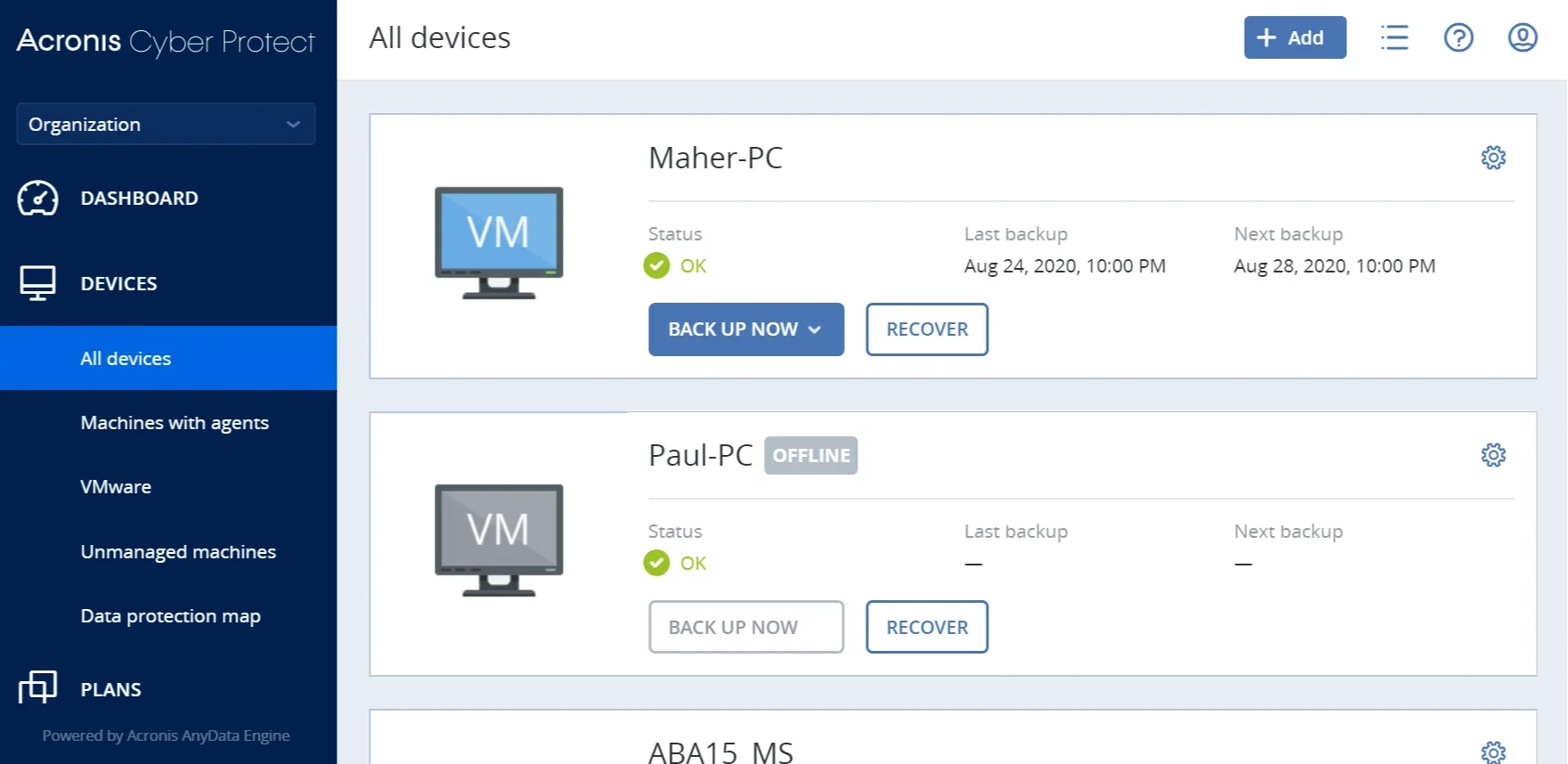
Acronis Program Screen
Increasingly, companies are implementing data protection using a chosen combination of backups to optimise the protection process and expedite recovery when needed. Acronis Cyber Protect is a tool that combines backup creation with advanced protection technologies against ransomware and other threats. Its main advantages include automated, incremental backups, rapid data recovery, and integrated antivirus and anti-malware tools.
Thanks to the use of AI for threat detection, Cyber Protect safeguards your data and significantly enhances protection against cybercriminal activities. Acronis also provides flexible storage options tailored to your current needs: NAS, SAN, disks, Acronis Cloud, or any private or public cloud.
Check also: Data leakage in your company. What can you do?
Where to store data – cloud backup or local backup? The 3-2-1 rule and its assumptions
The location of a full backup is also a subject of debate: physical media or the cloud? Both forms of company data protection have their advantages and disadvantages, which is why the ideal solution is to use both, in accordance with the so-called 3-2-1 rule, recommended by IT specialists, especially for large resources. The individual digits refer to three fundamental assumptions:
- 3You should have at least three copies of the data. The first is the original data, and the two subsequent copies are backups, reducing the likelihood of total data loss.
- 2Backups should be stored on at least two different types of media. For example, you could store one copy on a local disk and another in the cloud.
- 1One backup copy should be stored off-site in case of an unforeseen disaster that could destroy data stored locally.
A sensible approach is to use a hybrid backup, which combines the advantages of both methods. With Acronis True Image, you can store backups both locally and in the cloud. This tool allows you to create system images, incremental and differential backups, as well as file synchronisation, ransomware protection, data encryption, automatic backup updates, and the ability to store backups in the Acronis cloud or on local disks.
The 3-2-1 backup rule is a very important principle from a security perspective. You'll gain even more by investing in a comprehensive solution that combines backup capabilities with advanced cybersecurity features.
How to create data backups in a company? Modern solutions

Backups should be performed regularly, ideally daily or at least once a week, depending on the intensity of operations within the company and the value of the data being stored. Backups, disk cloning, and cyber protection, which ensure security, rely on a well-configured backup plan. Acronis True Image will give your business full control over all processes and allow you to manage all protected devices through a web console. Fast backups and data recovery rely on the reliability, performance, and ease of use of this software.
The backup policy involves establishing procedures for creating, storing, and restoring data backups. It is important to update the assumptions of this policy in line with your company's changing needs, so you don't have to worry about new threats. Acronis Cyber Protect is a flexible and scalable solution. It stores data in a unified backup format, allowing you to restore it onto any platform, regardless of the source system.
Nicesoft offer
As experts in data protection, we provide effective tools for backup, disk cloning, and cyber protection. Nicesoft will not only help you organise your knowledge, but also implement a backup appropriate for your type of business.
Don’t wait for a crisis – take care of your data protection today. By choosing our solutions, you gain the assurance that your company is protected against the loss of key resources and modern cyber threats. Get in touch with us, and we will help you choose the best solution for your business!
 Polish
  English